My Flutter Routine - 3 Preparations After Installation
Every time I have a new idea and create a Flutter app, I follow a small routine because a lot is similar at the beginning of development. I’m going to tell you now what my Flutter routine is and exactly what I do.
Not in the mood to read? Then watch my short video about it.
1. Remove Comments
First, I remove all comments in the source code that I no longer need. While these are helpful at the beginning, they become unnecessary later. I use search and replace with the following regular expression to remove them quickly and effectively.
//.*2. Outsource MaterialApp and StatefulWidget
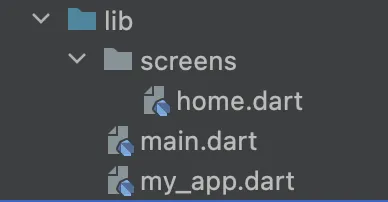
Then I outsource the “MaterialApp” and the “StatefulWidget” into separate files to make the code more organized. I also create a folder for my future screens and add my StatefulWidget there.
3. Implement Routing System
Since almost every app uses multiple screens, I need a system to manage all the routing. I create a separate file for this, where I list all the screens I’ll need in the future. At the beginning, I only add the home screen. What’s also very helpful for me is storing the route names as constants in the widgets. This prevents typos and is also helpful for navigating within the app.
That’s my Flutter routine. I hope you could take something away from it. If you’re more of a video type, feel free to check out my YouTube channel. I’ve summarized everything there in video form.
Subscribe to Newsletter
Get updates on new blog posts, tutorials and tips about Flutter, Laravel and more.