n8n Automation: Create Monthly App Download Reports Automatically
If you have apps in the stores, you know the drill: Apple App Store Connect and the Google Play Console are… let’s say “not the most intuitive”. Every month you log in, search for the right reports, download CSVs and try to make the numbers somehow comparable.
Since I already rely on n8n for automation for my apps (like Twork and Golmed), I built a workflow that takes this job off my hands completely. Once a month I now receive a nice HTML report directly via email - for example for the Golmed App, which automatically receives its monthly download report this way.
Here’s how I built it and how you can master the hurdles of the Apple API and Google Cloud Storage CSVs, step by step.
Why n8n Automation for App Reports?
- No manual effort: The workflow runs fully automatically on the 3rd of every month.
- Everything in one place: Apple and Android numbers combined in one email.
- Direct insights: I can immediately see new installations, updates and even the distribution by device (iPhone vs. iPad).
The Workflow Structure
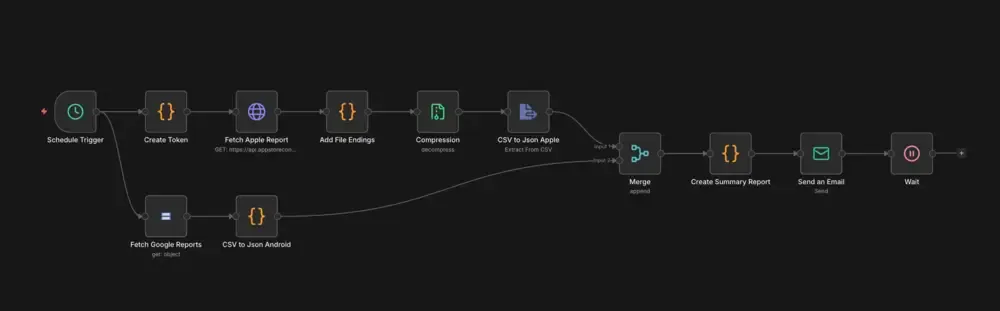
Here’s the step-by-step guide through my nodes:
1. The Kickoff: Schedule Trigger
The workflow starts via a Schedule Trigger. I’ve set it to the 3rd day of the month at 08:00 AM. Why not the 1st? Because Apple and Google sometimes take a day or two before the monthly reports are finally available.
2. The Apple Branch (JWT & API)
Apple doesn’t make it easy for us. To access the data, we need a JSON Web Token (JWT).
- Create Token (Code Node): Here I create the JWT via JavaScript. I use my Apple Credentials (Key ID, Issuer ID and the Private Key). This token is needed for authentication with the App Store Connect API.
- Fetch Apple Report (HTTP Request): With the token in the header, I query the salesReports. n8n automatically filters for the previous month (
$today.minus({ months: 1 })). - Add File Endings & Compression: Apple delivers the reports as compressed
.gzfiles. These two nodes ensure the file gets the correct extension and is decompressed so we have the CSV data in plain text. - CSV to Json Apple: A simple extraction node that converts the table data into handy JSON.
3. The Android Branch (Google Cloud Storage)
Google Play uploads reports to a Google Cloud Storage bucket.
- Fetch Google Reports (Google Cloud Storage Node): We grab the CSV file for the corresponding month directly from the bucket.
- CSV to Json Android (Code Node): This is a little lifesaver. Google CSVs are often encoded in UTF-16LE, which sometimes throws n8n off track. My Code Node cleans up the data, removes null bytes and converts everything into clean JSON.
4. Merging & Processing
- Merge: This is where the data from Apple and Google comes together.
- Create Summary Report (Code Node): The centerpiece. Here I calculate the numbers:
- How many new installations were there in total?
- How many updates were performed?
- How many active devices do we have on Android?
The result is rendered directly into a sleek HTML template (with responsive design for mobile!).
5. Sending: HTML Email Report
To make sure the report isn’t just a dry table, I built a custom HTML template. The goal: the recipient should see at a glance how the month went - without having to dig through columns of numbers first.
Send an Email (SMTP): The finished HTML is sent via SMTP as an email. Subject line: [App Name]: Performance Report [Month].
Here’s what the finished report looks like:
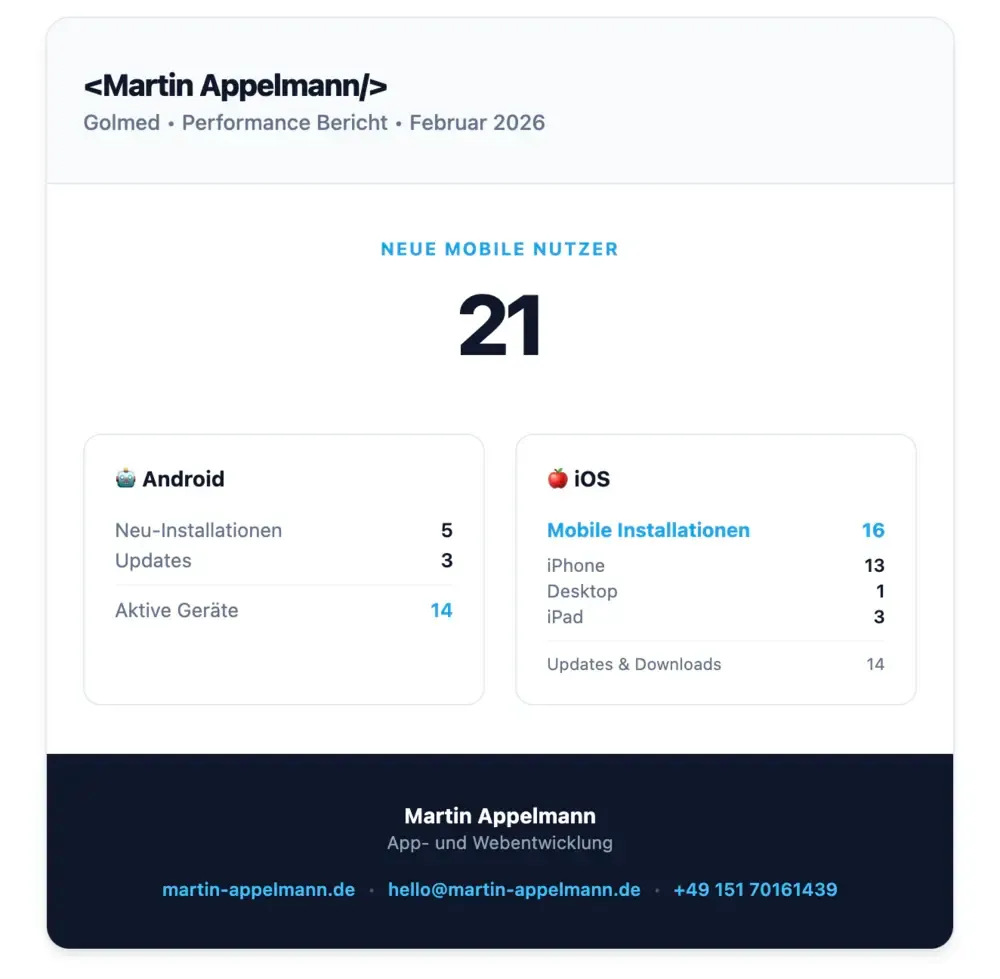
The Result
Instead of slogging through two dashboards, I open my email in the morning with my first coffee and immediately know how the last month went. For the Golmed App, this means: a clean report every month without a single manual click.
Conclusion
n8n automation like this frees up your mind for what really matters: developing your app. In my app Twork, I use n8n for almost everything - from analytics to marketing automations.
Want to automate your processes too, but don’t have the time to dig into every node?
Whether it’s n8n workflows, API integrations or complex backend logic: As a Full Stack Developer for Workflow Automation, I’m happy to help you take your processes to the next level.
Just send me a message or get in touch directly!
Subscribe to Newsletter
Get updates on new blog posts, tutorials and tips about Flutter, Laravel and more.