Why Flutter Riverpod is the Worst Choice.
OK OK. Admittedly, the title is a bit too harsh. However, I had to deal with Flutter Riverpod for work-related reasons and I hated it. Then I took a closer look at it and… well, I was still not quite convinced. But let’s take a look at this together.
As a developer, you’re surely familiar with the importance of state management systems when developing an app. But implementing a state management system is anything but simple. Flutter Riverpod is one of the better-known solutions for this, which is even listed on the official Flutter page.
If you’re alternatively interested in Flutter Bloc, then check out here my detailed blog post about Flutter Bloc. And many thanks to Andrea and the Flutter Riverpod blog post from him for many inspirations. There’s also a comparison of Bloc and Riverpod. Feel free to check that out too.
The Facts About Flutter Riverpod
Flutter Riverpod was developed by Remi Rousselet. It’s based on the Provider package, but goes a step further and offers the concept of dependency injection. With Riverpod, you can access all your providers throughout the entire app, which offers several advantages for you as a Flutter developer. These include:
- Easy to use: With Flutter Riverpod, you can define your app’s dependencies and make them accessible throughout your entire app.
- Independent: Riverpod makes all providers available across the entire app. As your app grows, Riverpod can also handle more complex state management scenarios.
- Testable: Riverpod makes it easier to test your app’s state management by allowing you to mock your dependencies.
- Performance: Riverpod is based on the Provider package, which is known for its excellent performance.
Why Not Just Use Provider?
You’re welcome to. But there are some problems with access across parallel widgets. Take a look at this overview.
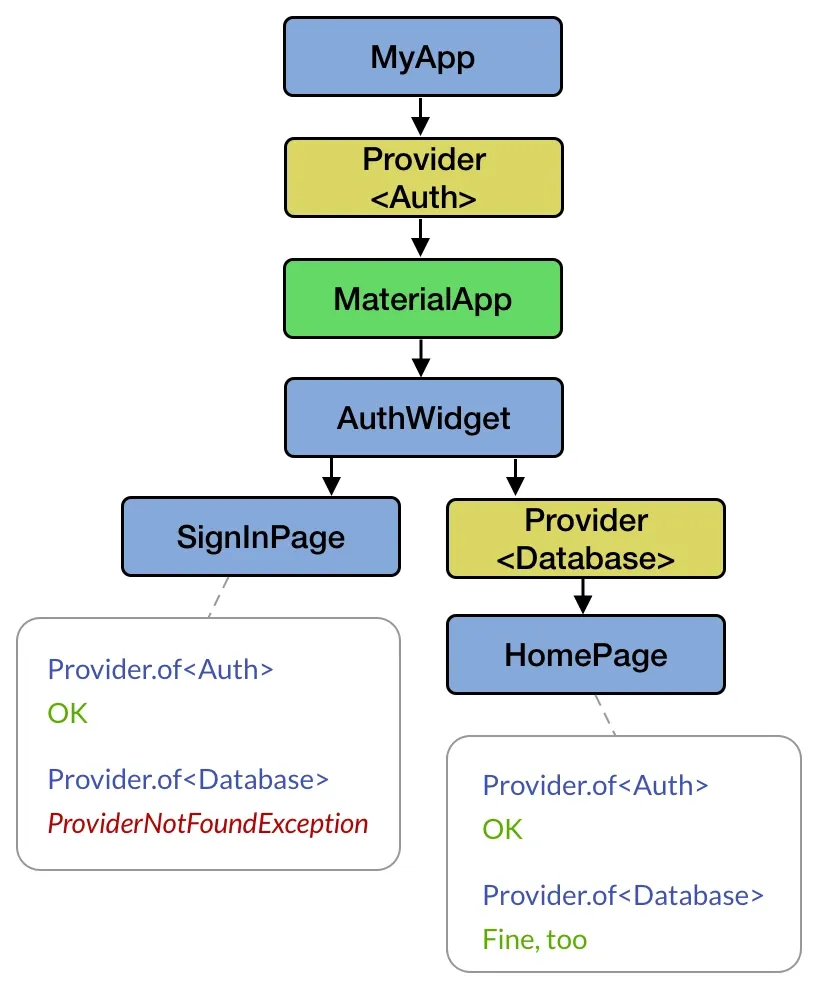
As long as the provider is in the subtree, there’s no problem. However, as soon as you want to go beyond one widget in parallel, this poses a problem for the conventional provider. For this reason, Riverpod decided to simply make all providers available at all times.
How Does Flutter Riverpod Work?
Flutter Riverpod works with the concept of “providers”. Providers are objects that hold data or functionality that can be accessed throughout your entire app. Providers can be either “read providers” or “write providers”.
Read providers: These providers hold data that can be accessed throughout your entire app but cannot be modified.
Write providers: These providers hold data that can be accessed and modified throughout your entire app.
Getting Started with Riverpod
Before we begin, we first need to agree on which package we want to install. Riverpod offers three different packages here. However, only the “flutter_riverpod” package is relevant for us.
| App Type | Package Name | Description |
|---|---|---|
| Flutter + flutter_hooks | hooks_riverpod | A combination of flutter_hooks and Riverpod. |
| Flutter | flutter_riverpod | Enables using Riverpod in Flutter applications. |
| Dart only | riverpod | A Riverpod version without the Flutter classes. |
To get started with Flutter Riverpod, install the package with the following command:
flutter pub add riverpodAlternatively, you can also manually add the package to your pubspec.yaml file and run flutter pub get
dependencies:
  flutter_riverpod: ^0.14.0+3
Once we’ve installed Riverpod, we add the ProviderScope to our main.dart. This gives us
access to all providers within the app.
void main() {
  runApp(ProviderScope(
    child: MyApp(),
  ));
}
Now the Actual Work - Providers
Let’s look at a Hello World provider:
final helloWorldProvider = Provider((ref) {
  return 'Hello world';
});

class HelloWorldWidget extends ConsumerWidget {
  @override
  Widget build(BuildContext context, WidgetRef ref) {
    final helloWorld = ref.watch(helloWorldProvider);
    return Text(helloWorld);
  }
}
Providers can be implemented in the widget file itself or in a separate file, which I definitely recommend. For this example, we’ll leave the provider in the same file.
To access the providers, we use the ConsumerWidget instead of a StatelessWidget. This widget specially created for Riverpod now has an additional ref parameter in addition to the context parameter. This ref parameter serves as an interface to access all providers.
Now there are three different ways to get data from a provider.
// Returns the data once
final String helloWorld = ref.read(helloWorldProvider);

// Returns the data after each update
final String helloWorld = ref.watch(helloWorldProvider);

// Similar to 'watch'.
// Difference: Data is returned via a callback.
ref.listen(helloWorldProvider, (previous, next) {
  print(next)
});
The first example should be clear here. When I need the value of a provider once, we use ‘read’. An example use case would be in the initState method or in the onPressed method of a button.
The ‘watch’ method returns the value every time it has changed. ‘Watch’ is mainly used in the build method to update the UI with the current value of the provider.
Then we have the listener method. This has a void return value, but a callback with the current and previous value of the provider. Use cases for this would be displaying snackbars or similar notifications, as well as triggering other events.
Yes, All Cool. But What About Futures?
Nice that you ask. I’ve prepared something for that.
final cocktailFutureProvider = FutureProvider.autoDispose<List<Cocktail>>(
  (ref) {
    final cocktailRepository = ref.watch(cocktailRepositoryProvider);
    return cocktailRepository.getRandomCocktails();
  });

final cocktailRepositoryProvider = Provider((ref) {
  return CocktailRepository(); // declared elsewhere
});

ref.watch(cocktailFutureProvider).when(
  loading: () {
    return CircularProgressIndicator();
  },
  error: (error, stack) {
    return Text(error);
  },
  data: (cocktails) {
    return Text('Cocktails fetched done!');
  },
);
This code snippet is from my State-Management-Repo. When it comes to loading data from an API and working with Futures, Riverpod offers the FutureProvider.
In the build method, the ‘watch’ method has an additional feature for this. With ‘when’, it’s possible to display the different states of the asynchronous call in the UI. With ‘loading’ for the loading animation, with ‘error’ for the error notification, and with ‘data’ for successfully loading and displaying the data.
But Is Riverpod Really That Bad?
Well, no. But I’m still more of a fan of Flutter Bloc. But why? For one, because humans are creatures of habit and I’ve already implemented several projects with Bloc. On the other hand, I find it somehow creepy that I have to rewrite all my widgets to ConsumerWidgets.
Then I have a problem with all providers being reachable from everywhere. I’m more of a fan of having self-contained widgets.
But if you have more experience with Riverpod, feel free to write me a comment about it. Maybe you’ll teach me something better. I may not be seeing the advantages properly yet.
Otherwise, I can recommend my post about Flutter Bloc to learn about an alternative state management system.
Subscribe to Newsletter
Get updates on new blog posts, tutorials and tips about Flutter, Laravel and more.